
The price of delivery depends on how far you take it.
When your own or a contracted courier delivers the order, the fee is a matter of kilometres, not parcel weight. This plugin works out the fee at checkout from the road distance to the courier’s starting point — and once the order is paid, the courier is informed by e-mail.
WooCommerce plugin · OmniBit add-on
Let’s talk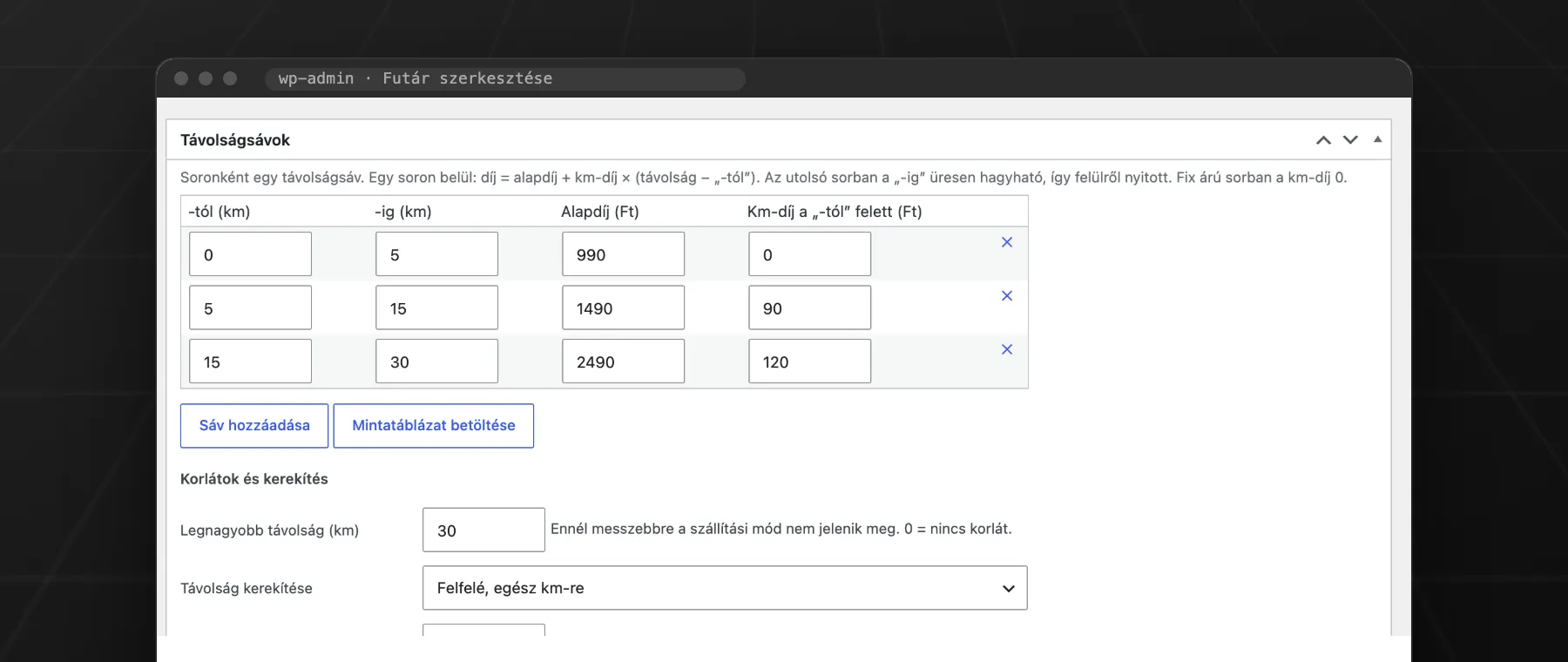
When the delivery fee has to be worked out by hand
Bulky or fragile goods rarely go with a parcel carrier, and the price depends on distance — a web shop has no notion of kilometres.
How it goes now
You work out the delivery fee order by order, by hand, then write back to the customer.
The customer sees no price at checkout, so they phone instead.
The courier gets the order details in a separate message, and it is easy to leave something out.
The customer does not know who is bringing the parcel.
How it goes with this
Once the address is entered, the checkout shows the fee based on the road distance.
The fee follows the courier’s own price table, which you set up once.
For a paid order the courier gets an e-mail at once with name, phone number, address and items.
The customer also gets a message with the courier’s name and phone number.
From setup to the first delivery
Add a courier
You enter the name, phone number and the e-mail address where the job is sent. You type in the starting address — the plugin finds the point, and you can check it with a map link.
Price table
You define kilometre bands: from where to where, the base fee, and the fee for each further kilometre. A new courier starts with a sample table that you overwrite.
Shipping method
In the delivery zone you add the “Distance courier” method, choose the courier, and set the fee mode, tax, note and payment methods.
Six things that matter for courier delivery
Road kilometres
The fee comes from the road distance between the starting point and the delivery address. The distance is rounded up, to the nearest kilometre, or not at all.
Banded price table
Each band has its own base fee and a fee per kilometre. The total is rounded to the step you choose, for example 100 forints.
Maximum distance
You can set how far the courier goes. Beyond that, the option does not appear at checkout at all.
Pay the courier
You can set the fee to 0 and have the label say it is payable to the courier. At checkout, only the payment methods you chose for this delivery are offered.
A clear label
The customer sees: “Courier – 16 000 Ft”. Your own information text appears under the fee.
To courier and customer
The courier gets the name, phone number, address, items, kilometres, fee and order number. The customer gets the courier’s details.
Small things that matter day to day
They don’t go in the brochure, but they decide whether delivery stays smooth.
What it needs
Let’s look at your courier
Tell us how many couriers you work with and where they start from, and we will show you what it would look like at checkout.