
The more they buy, the cheaper each one.
Someone who buys ten should not pay the same per piece as someone who buys one. This plugin assigns quantity tiers to products, categories or the whole shop — and the customer sees in a table on the product page how much they save by adding a few more to the cart.
WooCommerce plugin · OmniBit add-on
Let’s talk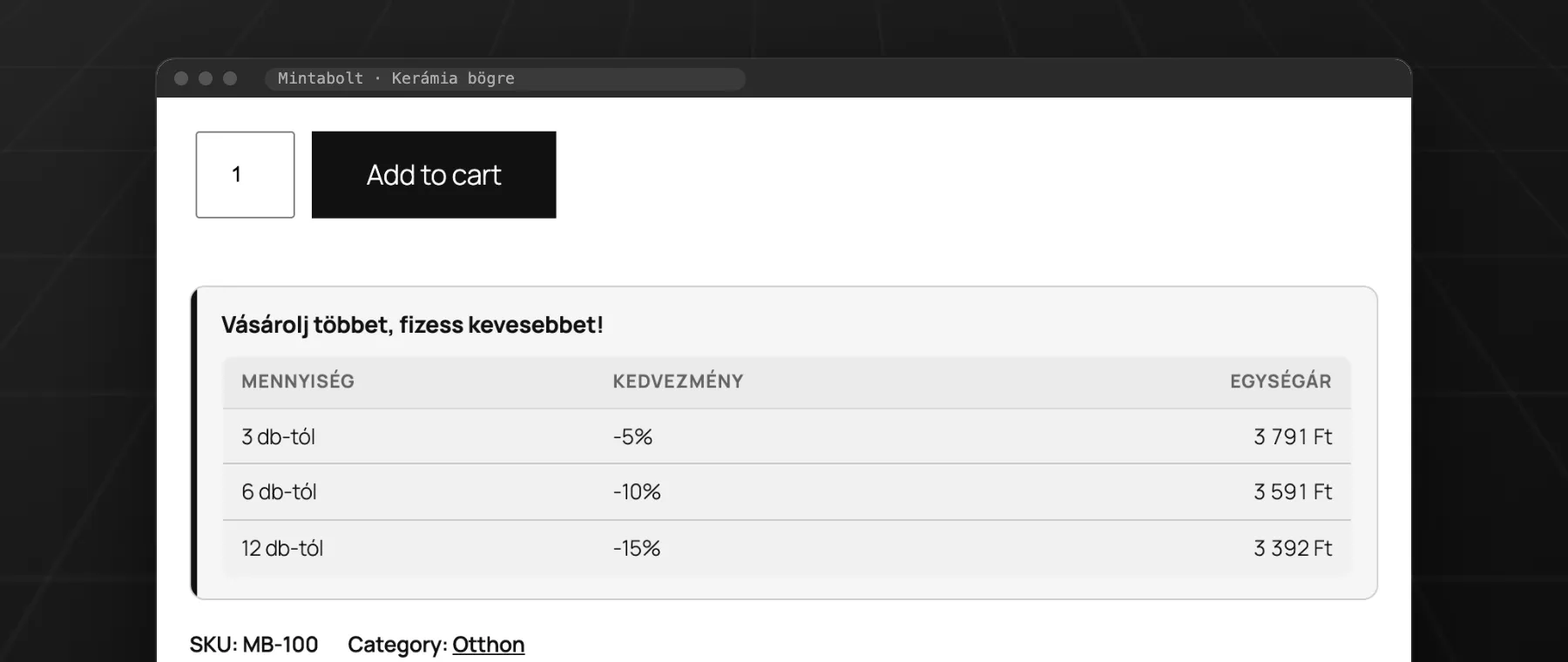
When a bigger order costs the same per piece
The customer buying in bulk always asks whether there is a discount — and the answer lives only in emails or in your head.
How it goes now
Discounts on bigger orders are given on request, so they differ from order to order.
The customer does not know they are only a few pieces short of the next tier.
Whoever buys a lot writes in for a quote and has to wait for the answer.
The discount has to be entered by hand, and it is easy to miscalculate.
How it goes with this
You set the tiers once, and the cart works out the price by itself.
A table on the product page shows what one piece costs at 5, 10 or 50 pieces.
The discount shows on the cart line itself: the old unit price struck through, the new one beside it.
The order keeps which rule gave how much.
From the rule to the first discounted cart
Rule
You give it a name and say what it applies to: chosen products, categories or the whole shop. If needed, you add a customer group and a period.
Tiers
You set from how many pieces to how many a discount applies, and how much: a percentage, an amount off per piece, or a fixed unit price. The upper limit can be left empty.
Go live
After saving, a status label shows whether the rule is live. The customer sees the table under the add-to-cart button, and the cheaper line in the cart.
Six things a bulk buyer notices
Product, category, whole shop
Pick products or categories — subcategories are included — or let it apply to the whole shop.
The whole product or one size
On a product with several sizes, the rule can cover all sizes or just a single one.
Three kinds of discount
A percentage, an amount off per piece, or a fixed unit price.
Table and live total
The table shows quantity, discount and unit price, and a line under the quantity box works it out: “At 5 pcs: total …, you save …”.
Role and period
A rule can be for everyone, for certain customer roles, or for logged-out visitors. With a start and end time it can run like a promotion.
Visible where it counts
In the cart and at checkout the new unit price stands beside the struck-through old one, with “You save …” beneath. The order line keeps the discount too.
Small things that matter day to day
These do not make the brochure, but they decide whether the rules stay predictable.
3
3
What it needs
Let’s look at your range
Tell us which products you sell in bigger quantities, and we will show you what the discount tiers would look like.